If you are a regular gamer who enjoys playing online Pogo games, you might have noticed how these games tend to slow down quite often. The overall error-free functionality of a game is as important as the game’s main theme itself.
A game that lags, freezes or stutters will ultimately annoy the player and might just make him or her switch to another game instead.
Clean Up System Cache, Speed Up Computer
ST Cleaner is a digitally signed, verified software
Fortunately, Pogo itself has come up with a feature called Compatibility Scan for users who face such issues. Once you follow the link given below, the website’s built-in tools will determine what features of your system may have been causing the problem.
https://www.pogo.com/system-info
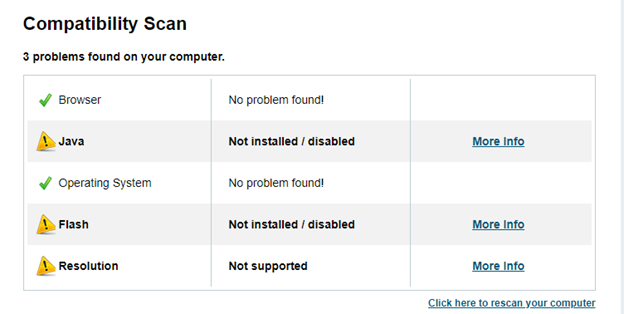
Once you have the results, you can work on the factors that are causing the trouble.
Here are a few tips you can follow as an attempt to improve your gaming experience.
Clear History, Cache and Cookies
History and cache of a browser occupy tons of storage space in a computer. Clearing this junk is likely to help you speed up your games.
- If you see the top right-hand corner of your browser’s interface, you will observe a symbol representing either Settings or Tools. This varies from browser to browser.
- Once you click on such a symbol, a new menu will appear in front of you. Look for History and select it. Now, a new window showing all your browsing history will appear.
- Here, you will also see an option saying Clear History or Clear Browsing Data. Choose this option.
- Depending on your browser, you will see other options like Clear Cache and Clear Cookies while following the previous steps. Select these to clear the cache or cookies and recover more space.
Update or Reinstall Your Browser
Updating your browser regularly is likely to help too. Newer versions of browsers can easily be downloaded from the Internet. These newer versions tend to have more advanced features, which might help you avoid bugs or crashes during gameplay.
If you uninstall and reinstall your browser, this will simply be an alternative to clearing history, cache and cookies manually.
Disable Plug-ins or Extensions
While it is true that many plug-ins and browser extensions have valuable functions, not all of them are always needed. Just like any extra software programs being opened slow down a computer system, excess plug-ins or extensions also slow down a browser and in turn, adversely affect your game. This may cause your game to crash every now and then.
To avoid such cases, it is better to disable your browser’s plug-ins or extensions before starting your online game. This can be easily done by going to the Settings of your browser and looking for Extensions. The exact steps may vary from browser to browser but the overall procedure would remain the same.
Recheck Java and Flash
Most of the Pogo games operate either using Java or Flash. It might be possible that one of these programs (the one required by your game) is disabled. Your first step should be ensuring that these features are enabled before you look for more fixes.
Enabling these tools is a very easy task. Most browsers have the Settings button at the top right corner. When you click that button, you can see a list of other options. If you are unable to find Java or Flash directly from this list, you might have to look for the Advanced button/ section. From here, you can select the right option.
It is suggested that users also regularly update their browser’s Adobe Flash and Java. Based on tests and reviews, these software tools are regularly updated by their creators to meet the changing users’ demands. The newer versions well help you in having a smoother gaming experience. You can easily update Java and Flash from the respective websites.
Close Extra Tabs
As mentioned earlier, opening unnecessary programs on your computer system slows it down. Similarly, opening multiple unnecessary tabs on your browser can disrupt your gaming experience. Experts suggest that in order to avoid slow gaming, you should close all extra tabs before you launch the game.
We hope these suggestions helped you in improving your gaming experience!
